
Showing posts with label 2view. Show all posts
Showing posts with label 2view. Show all posts
Tuesday, June 28, 2011


Monday, June 20, 2011
Get Your Tots to Flash a Grin with Samsung’s New Camera Animations
Following is a review of ST700 dual LCD camera provided by Technabob.

Saturday, June 18, 2011
The Samsung ST700 Makes It Easier for Kids to Focus on the Frame
Following is a review of Samsung ST700 dual LCD camera.


Monday, June 13, 2011
Samsung 2View’s New Facebook App: Change Your World
Following is a review of ST700 dual LCD camera.
Did you notice any changes to the Samsung 2View Facebook menu? A new application has been added! Ta-da! ‘Change Your World.’
This application allows users to virtually go around the world and visit famous destinations using an avatar of your face. Using the 2View camera, you can capture fun and fabulous moments! Whether you are in the city, at the beach, at a stadium, in the jungle or at the circus, you can try out the 2View’s distinctive features such as self-shot, jump shot, children mode, and self timer. With you own avatar, ‘Change Your World!’ doubles the fun and doubles the 2View function of the front LCD!
Now, let’s take a closer look at how to use ‘Change Your World.’

1. Select gender
Click on ‘Enter’ under the ‘Change Your World’ picture and you will be taken to a page where you select your gender. your gender or choose the opposite gender for a funny outcome!

2. Create your avatar
Once you have selected your gender, you are ready to create your avatar. You can either take a picture using a webcam or you can upload one from your PC or Facebook (file should be smaller than 500KB). You can adjust the angle, size, location, color, and brightness of the picture.

3. 2View world tour
Now you are all set to go on a tour of the 2View world in a host of different backgrounds: the city, beach, stadium, jungle, and circus. Different poses and situations will make you burst into laughter! You can also find information on self-shot, jump shot, children mode, and self-timer on the lower right hand side, so be sure to check it out!

4. Photo sharing
Once the 2View world tour is over, the pictures you have taken will appear in a photo album. Click on the Facebook icon to upload your pictures and slides to your wall so you can share them with your friends and families! If not, you can simply store it on your hard drive.

I strongly encourage you to try out the functions yourself rather than reading the manual. ‘Like’ Samsung 2View Facebook page and go explore ‘Change Your World’ to enjoy the 2View functions and fun to the fullest!
Enter 2View World: http://facebook.com/samsung2view

And of course, the description on the new ST700 series… For more information on its specifications and functions, click on the following link: ST700 / ST700 micro site
Here is the link to thesource:
http://www.samsungimaging.net/2011/06/13/samsung-2views-new-facebook-app-change-your-world/
Tuesday, June 7, 2011
SAMSUNG ST700 Animation
Following is a video clip displaying the animation on the front LCD of ST700.


Monday, June 6, 2011
Bestselling in Samsung Digital Point & Shoot Cameras on Amazon
Following is a introduction to Samsung ST700 camera.


Thursday, June 2, 2011
samsung pl120 camara doble pantalla samsung con hd 14 mepapixeles
Following is a review of Samsung PL120 dual LCD camera.


New and distinctive features of the newly launched 2View cameras
Following is a review of 2View cameras from Samsung.
Hi! It’s So-Young again!
We are in full spring mode now with much warmer weather and blossoming flowers. How are you all enjoying the spring weather? It’s a good time to go outside with your family or a date. I hope you make lasting memories this spring.
As if to celebrate the coming of spring, Samsung has launched new 2View cameras: the PL120, PL170, and ST700. The actual launch timing may vary by region. The new products are armed with cool new functions on top of the front LCD, a key differentiator of 2View cameras. For those who are curious to learn about the new features and differences by model, I will go over those today.
For more detailed specifications of each camera, click on the link below.
Specifications of the PL120
Specifications of the PL170
Specifications of the ST700

1. Magic Frame

One of the key differences of the ST700, PL170, and PL120 models compared to the ones released last year would definitely be the Magic Frame function. Using the 12 special background frameworks, you can come up with unique photos effects such as Wall Art, Old Film, Ripple, Full Moon, Old Record, Magazine, Sunny Day, Classic TV, Yesterday, Holiday, and Billboard 1,2. Just like the ones above! These functions will definitely spice up your photos!
2. Smart Filter

The ST600 and ST100 offered six Smart Filter functions: Miniature, Vignetting, Fish-eye filter 1 & 2, Sketch, and Defog. The ST700, PL170, and PL120 models offer additional functions: Old Film 1 & 2, Soft Focus, Half Tone Dot, Classic, Retro, and Negative Filter. With such a wide variety of Smart Filter choices in your hands, you will be able to produce expert-like photos.
3. Touch Screen

The back LCD displays for the ST700, ST600, and ST100 is touch display, just like a smartphone. For those used to using a touchscreen, I recommend the ST series. Meanwhile, the new PL170 and PL120 come with a main display of 3.0 inch and 2.7 inch respectively, with buttons on the right side for control. So, pick and chose a stylish compact camera of your taste to capture portraits of daily events as well as splendid and grand landscapes!
I hope my posting helped to answer some of your questions on the new 2View cameras.
You can also visit the 2View Facebook page for sample photos and photos taken using the Magic Frame and Smart Filter in the photo album and wall.
You can also share your own photos taken with the 2View camera, so make sure to visit, look around, and share your story!
That’s it for today. Until the next 2View class, bye bye!
Here is the link to the source: http://www.samsungimaging.net/2011/06/01/new-and-distinctive-features-of-the-newly-launched-2view-cameras/
Saturday, May 28, 2011
Jonathan Takiff: Season's gadgets
Following is a review of ST700, dual LCD camera, posted by iStockAnalyst.


Thursday, May 26, 2011
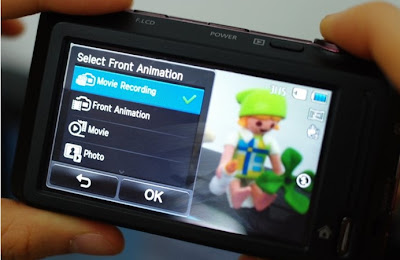
ST700 - Children Mode Animation
Following is an image showing how to make your own animation for the children mode of Samsung ST700 camera.

Monday, May 9, 2011
Samgung PL120 Unboxing/ Video Test 720 P 15 Frames per second
Following is a unboxing video review of Samsung PL120 camera.


Road Test Samsung PL120 720 P 15 F Test evening time
Following is a road test video sample using a PL120 camera.


Sunday, May 1, 2011

Sunday, April 17, 2011


‘Jump & Shoot!’ Samsung MENA Promotion: How to Win the Brand New 2View Camera!
Here is an article about PL120 2View camera. Do you want to win the latest Samsung 2View camera? If so, here’s a tempting online contest! 
Samsung Camera MENA (short for ‘Middle East and North Africa’) is launching a photo contest titled ‘Jump & Shoot’ on its Facebook page to announce the unveiling of the brand-new 2View camera.
Winners will be awarded the PL120 on this event. Shall we briefly find out about the PL120? The PL120, one of the latest Samsung 2View cameras including the PL170 and ST700, is the perfect digital camera for capturing your daily life and special moments. The extra 1.5” LCD on the front of the camera is ideally positioned for taking self-portraits and group shots, and the PL120 will come in handy when having fun with friends. It has Children Mode and downloadable animation options to keep kids’ attention. Also, the Jump Shot mode offers a countdown before taking two continuous shots. Isn’t it awesome? You will never have more fun with other cameras! To win this PL120, please make sure you know how to enter the contest by reading the instructions below.

How to apply
1. Go to the ‘Jump & Shoot’ tab on Samsung Camera MENA’s Facebook page : http://www.facebook.com/SamsungCameraMena
2. Enter the contest
3. Fill in your information and upload your jump shot, couple shot, or baby shot
That’s all! Isn’t it easy? Watching the Samsung 2View camera video on this page might help you understand more quickly. The photos you upload will be posted onto its Photo Gallery. Just show off your impressive photos! Also, you can watch the other entries in it. Come see the nice photos!
Please note that this promotion is intended for the residents of the under-mentioned countries;
UAE, Kuwait, Oman, Bahrain, Qatar, Egypt, Iran, KSA, Lebanon, Jordon, Syria, Morocco, Algeria, Tunisia, Pakistan
So if you are a resident of one of these countries, how about participating in this contest right now?
This promotion runs from April 6th to May 15th on Samsung Camera MENA’s Facebook page. To see more information and to join this event, please click here: http://www.facebook.com/SamsungCameraMena
Subscribe to:
Posts (Atom)