Samsung launched a next generation of YP-P2 in Korea, so called “P2 DMB”. The previous version, P2 has been popular among the MP3 users in the world since it was launched last year. Recently, Samsung developed P2 DMB, a sister product of P2 which supported DMB (Digital Multimedia Broadcasting) for Korean users only. Unfortunately, the DMB feature will not work in the USA or other countries. This means that P2 DMB should be used only in Korea to use the full advantage of the DMB feature.
Although P2 DMB is limited to Korea territory, I hope that the following P2 DMB review is helpful for MP3 users in other countries.
P2 DMB looks very similar to P2 in shape and features. The main features supported by P2 DMB are video, music, pictures, DMB, Datacasts, text view, English/Korean dictionary, alarm, calendar, address book, world clock, FM radio, file browser, and Bluetooth which can be connected with stereo headset and mobile cell phone for listening to the music, transferring files, and phone calls.
As you can see the features above, P2 DMB is very much similar to P2. Samsung announced that coming firmware upgrades would include new functions such as DMB program guide, DMB schedule recording, games, and other convenient features as well as unknown bugs.
Now, let’s see the package first.Gift Package

The gift package is not a normal box. I had to spend a little bit more time to open it. Two boxes were crossover each other. You may realize the structure of the box once you get one. The contents of the package are P2 DMB player, earphones, ear cushions, USB cable, quick user’s guide and an LCD protection film, Samsung Media Studio installation CD, DMB antenna, and a “For You” card which implies that you are so special and valuable for Samsung.
Stylish & Thin Design
 P2 DMB looks so simple. The front side is full of 3” touch screen LCD. The hold and power buttons are on the left side, the volume up/down buttons on the right, the 24-pin port and earphone port on the bottom, and the DMB antenna port on the top. The dimension is 52x100x11.95mm (WxHxD). P2 DMB is a little bit thicker than P2 but I could not feel much differences. P2 DMB has a steel strip around the player which looks more durable, and valuable.
After detaching the DMB antenna from the player, the antenna can be connected to the hand strap for portability.
Easy-to-Use User Interface
The menu is composed of three types: Cosmos, Matix, and My Skin. The Cosmos menu type displays only three items per screen. I had a hard time to figure out how to get to the next menu items such as Music, Video, Picture, Settings, etc. And finally, I found the way. It was a stroke method. This is a similar gesture when you turn a page of a book. Put a finger on the screen, slide the finger a little bit on the screen, and release the finger. The stroke method also works when you change the volume. On the Music, DMB, or Video mode, touch the right side of the screen and apply the stroke method to change the volume.
DMB Support
The DMB (Digital Multimedia Broadcasting) feature including DAB is a popular system in Korea. Many cell phones, Navigation devices, and Personal Media Players now support the DMB feature in order to allow users to watch TV channels in live. I believe P2 DMB is the first MP3 player that supports DMB in the MP3 player product category. P2 DMB supports only the Terrestrial DMB which means that broadcasting area is limited. If you take it to a mountain where a DMB transmitter is not supported, it may not work.
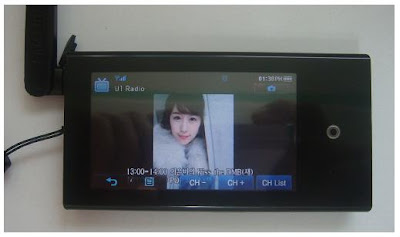
However, DMB is a useful outdoor TV. While we are moving around by bus or subway, we can enjoy a live sport, drama, or show. Samsung announced that the future firmware upgrades would include EPG (Electronic Program Guide) which is a kind of TV guide. Through the EPG feature, you can make a reservation to record or watch a channel. Using the EPG feature is free of charge while other companies charge certain amounts. Samsung will provide the EPG information to the user through EmoDio™. Once the user connects P2 DMB to EmoDio™, one week EPG information will be transferred to P2 DMB for free.
Video Support

Samsung Media Studio automatically converts video files to SVI format, the Samsung’s video file format for P2 DMB during download process. As the format conversion (encoding) takes time, you would need more patience if you want to download large size video files to the player in real time. In order to save time, I would strongly suggest converting video files before you go to bed or when you have time. The Samsung Media Studio has a feature to do so and turns off PC after conversion. This helps me to watch my favorite movies on P2 DMB.
Datacast Support
Datacast is a very useful feature. Using Samsung Media Studio, the Datacast feature allows you to automatically receive your interested and updated information from the web, Blog, news, and UCC sites without having you to visit the sites. I could enjoy reading the updated information through P2 DMB instead of reading newspapers in subways when I go to work or when I am not in front of PC.
Enhanced Sound Quality
DNSe is a 3D sound effect that Samsung developed for MP3 players. The 3D is three dimensional sound effect added to the music. And the street mode boosts the lower sound so that you can use this mode at a noise environment to listen to the low sound music more clearly. I could distinguish various sound effects provided by P2 DMB including DNSe.
Bluetooth Support

The Bluetooth feature is one of the useful features. Through Bluetooth, we can wirelessly use a stereo headset, mobile phones, and any other Bluetooth devices such as home theater systems. The range of Bluetooth supporting wirelessly is 10m. I have a Bluetooth cell phone which is not made by Samsung Anycall. I could easily download photo files from my cell phone to P2 DMB and also listen to the music through my Bluetooth headset. However, I could not do a phone call from P2 DMB. There must be a conflict between my cell phone and P2 DMB. This means that P2 DMB is not fully compatible with all the Bluetooth cell phone. But it is still a good feature.
Prime Pack
The Prime Pack consists of text viewer, English/Korean dictionary, alarm, calendar, address book, world clock, and FM radio. Among those features, the dictionary feature would help students or people to learn English.
Also, I mostly use the FM radio and test viewer features. P2 DMB is useful when reading some text files of novel books rather than taking the real books to read.
Music Menu
The Music menu supports lyric display. Once a music file has been updated to contain its lyric using the Samsung Media Studio, the lyric can be displayed while listening to the music. Otherwise, a CD animation is displayed.

Optional Accessories:
Docking Station (Cradle)

The docking station is an optional accessory. It has a built-in speaker. When P2 DMB is inserted in it, the docking station uses the P2 DMB’s battery and audio sound comes from it. The docking station looks like a UFO (Unidentified Flight Object). It has a nice touch and glossy finish. This docking station is also compatible with YP-P2, YP-T10, and YP-S3 with a provided rubber adapter which fits in the contact area between the docking station and the player.
Zenon Speaker

The Zenon speaker is also an optional accessory which can be a useful speaker when watching a DMB channel together with some people around me. There is a coin holder on the back of the Zenon speaker. Once you insert a coin in it, you can make the P2 DMB player stand alone. This is a pretty good idea.

Specification
Audio Format: MPEG1/2/2.5 Layer 3 (8kbps~320kbps, 8KHz~48KHz),
WMA (48kbps~320kbps, 8KHz~48KHz), OGG (Q1~Q10)
AAC-LC2 (24kbps~128kbps, 44.1KHz, 48KHz)
AAC-Plus (16kbps~256kbps, 16KHz~44.1KHz)
Enhanced AAC-Plus (16kbps~56kbps, 32KHz~44.1KHz)
Video Format: SVI (Video: MPEG4 Simple Profile, Audio: MP3 (CBR 44.1KHz, 16bit Stereo, 128kbps)),
Resolution: 480x272, Frame Rate: 30fps)
WMV9 (Video: WMV9 Simple Profile, Audio: WMA9 (Max 860kbps),
Resolution: 320x240 or 480x272, Frame Rate: 30fps)
Image Format: JPG (Baseline only)
Color: Black/White
LCD: 3” TFT LCD (Touch Screen)
Earphone: 20mW/Ch. (at 16 ohm)
Frequency Range: 40Hz~20KHz
Playback Time: 25Hrs of Audio, 5Hrs of Video (at 128kbps MP3 file, Volume at 15, Normal Sound Effect)
Weight: 97gram
Dimension (WxDxH): 52mm x 100mm x 11.95mm
FM Frequency: 87.5~108.0MHz
Battery Type: 1200mAh / DC 3.7V
Playback Time: Max. 46 hrs of music (at volume level 15, normal sound effect, LCD off), Max. 7 hrs of video, Max. 5 hrs of DMB
Pros:
Advanced Multimedia Technology: Allow users to watch DMB, listen to music and FM radio, view the music lyric, pictures and text, play video files, and Bluetooth.
Terrestrial DMB: Can enjoy DMB with clear sound at any place while moving.
Touch screen menu: Navigation is easily performed by touching the screen.
Wide color LCD screen: The wide screen displays as many as information colorfully.
Stylish & modern design: very thin and compact, vivid color & nice finish
Rounding design on the edge provides a convenient grip feeling
Long playback time
Wonderful DNSe2.0 sound quality
An optional compatible docking station (cradle) that can be used with YP-T10, YP-S3 and YP-P2
An optional Zenon speaker
FM recording and Datacast features
Future firmware upgrades for games, EPG and other features
Cons:
The touch pad is too sensitive.
The DMB antenna is a little bulky.
Voice recording is not supported.
P2 DMB can not be used while being charged.
Conclusion:
Although P2 DMB is limited to Korea, it is a quite impressive MP3 player. Koreans might like P2 DMB instead of P2 while P2 does not support DMB. The optional Zenon speaker for P2 DMB would also be a necessary accessory for watching DMB with friends together. I hope P2 DMB becomes a famous MP3 player among Korean users.
-Reviewed by goitworld -


